 Java, Spring and Web Development tutorials  1. Overview
Large Language Models (LLMs) have advanced to agentic systems capable of executing tasks more complex than simply generating text. One of the emerging areas is agent skills as introduced by Antropic.
Agent skills enable LLM to produce document files without an additional API, such as Apache POI. They invoke the built-in capabilities that generate documents on the provider server and return them via file identifiers. Spring AI supports skills with the Anthropic models, making it easy to integrate with Java applications.
In this tutorial, we’ll explore what Anthropic provides in terms of agent skills and how we integrate them with Spring AI.
2. Anthropic Pre-built Skills
Anthropic provides a set of pre-built agent skills that can generate a document and populate it with content. Thus, the model can return a document file rather than plain text.
Of course, there are a few document formats that Anthropic currently supports:
- DOCX: Word documents with formatting
- PDF: Formatted PDF reports
- PPTX: PowerPoint slides
- XLSX: Excel spreadsheets
In Spring AI, we can use these Anthropic pre-built skills by applying them via chat options.
3. Configuration
To get started with the Anthropic skills, let’s add the required dependency to pom.xml:
<dependency>
    <groupId>org.springframework.ai</groupId>
    <artifactId>spring-ai-starter-model-anthropic</artifactId>
</dependency>
Next, we configure the Anthropic API key in application.yml to use Anthropic models:
spring:
  ai:
    anthropic:
      api-key: "${ANTHROPIC_API_KEY}"
This way, we don’t need to supply the key separately.
4. Sample Implementation
To demonstrate the features, let’s build a simple web application that generates a sales report. Moreover, the implementation enables us to output a specific document format supported by the pre-built skills via the request prompt.
4.1. Data Service
To begin with, we need to provide a model to represent the data sent to the chat model:
public record MonthlySale(String product, int year, Month month, BigDecimal amount) {
}
For demonstration purposes, we create a simple data service layer to return hardcoded data. In this case, the service returns a List of MonthlySale containing 12 months of sales for product A and product B:
@Service
public class MonthlySalesService {
    public List<MonthlySale> getMonthlySalesForYear(int year) {
        return List.of(
            // Product A monthly sales
            new MonthlySale("Product A", year, Month.JANUARY, new BigDecimal("1200")),
            new MonthlySale("Product A", year, Month.FEBRUARY, new BigDecimal("1325")),
            ...
            // Product B monthly sales
            ...
            new MonthlySale("Product B", year, Month.NOVEMBER, new BigDecimal("1330")),
            new MonthlySale("Product B", year, Month.DECEMBER, new BigDecimal("1395"))
        );
    }
}
In reality, we could replace it with an MCP tool to retrieve the sales data from the database and integrate it with the chat model.
4.2. Controller
Next, we expose an HTTP endpoint to accept a request prompt that shapes the document content and format.
Since the document format isn’t known in advance, we return the mime type, which is determined from the chat model, to the client:
@RestController
@RequestMapping("/agent-skills")
@Validated
public class AgentSkillsController {
    private final AgentSkillsService agentSkillsService;
    public AgentSkillsController(AgentSkillsService agentSkillsService) {
        this.agentSkillsService = agentSkillsService;
    }
    @GetMapping("/report")
    public ResponseEntity<byte[]> genReport(@RequestBody @Valid ReportRequest reportRequest) {
        AnthropicDocument document = agentSkillsService.genReport(reportRequest);
        return ResponseEntity.ok()
          .contentType(MediaType.parseMediaType(document.mimeType()))
          .header(HttpHeaders.CONTENT_DISPOSITION,
            ContentDisposition.attachment()
              .filename(document.fileName())
              .build()
              .toString())
          .body(document.content());
    }
}
Let’s introduce a simple placeholder record:
public record ReportRequest(@NotNull String prompt) {
}
This holds the prompt message input by the user, which gets passed to the AgentSkillService.
4.3. Agent Skill Service
Now, we create a service to generate a document using the Anthropic chat model with the pre-built skills. The Anthropic chat options can support multiple skills.
In this example, we put all the available pre-built skills into the chat model, and employ the user prompt to control what document format we would like to produce. This aims to demonstrate that the chat model can select the appropriate skill based on the prompt.
However, it’s usually better to enable the required skills only to reduce the chance of outputting an unpredictable format:
@Service
public class AgentSkillsService {
    private final AnthropicChatModel chatModel;
    private final AnthropicApi anthropicApi;
    private final MonthlySalesService monthlySalesService;
    public AgentSkillsService(
      AnthropicChatModel chatModel,
      AnthropicApi anthropicApi,
      MonthlySalesService monthlySalesService) {
        this.chatModel = chatModel;
        this.anthropicApi = anthropicApi;
        this.monthlySalesService = monthlySalesService;
    }
    public AnthropicDocument genReport(ReportRequest reportRequest) {
        ChatResponse response = ChatClient.create(chatModel)
          .prompt()
          .system( "Given the dataset of monthly sales for our product: "
            + monthlySalesService.getMonthlySalesForYear(2025))
          .user(reportRequest.prompt())
          .options(AnthropicChatOptions.builder()
            .model("claude-sonnet-4-5")
            .skill(AnthropicApi.AnthropicSkill.DOCX)
            .skill(AnthropicApi.AnthropicSkill.PDF)
            .skill(AnthropicApi.AnthropicSkill.PPTX)
            .skill(AnthropicApi.AnthropicSkill.XLSX)
            maxTokens(4096)
            .build())
          .call()
          .chatResponse();
        List fileIds = AnthropicSkillsResponseHelper.extractFileIds(response);
        if (fileIds.isEmpty()) {
            throw new IllegalStateException("No document was generated by the skill");
        }
        return downloadReport(fileIds.get(0));
    }
    public AnthropicDocument downloadReport(String fileId) {
        AnthropicApi.FileMetadata metadata = anthropicApi.getFileMetadata(fileId);
        byte[] content = anthropicApi.downloadFile(fileId);
        return new AnthropicDocument(metadata.filename(), metadata.mimeType(), content);
    }
}
Notably, we set the maxTokens to 4096 to control the maximum amount of content that could be generated in a response. As a rule of thumb, one (1) token is roughly equal to four (4) characters. In this case, 4096 should be more than sufficient. However, we could extend it to a larger size if we expect a lengthy report.
Once we receive the response from the chat model, we can use the AnthropicSkillsResponseHelper to extract the file ID from that response. This file ID uniquely identifies the generated file stored on the Anthropic server.
Let’s check the files in the Claude console:
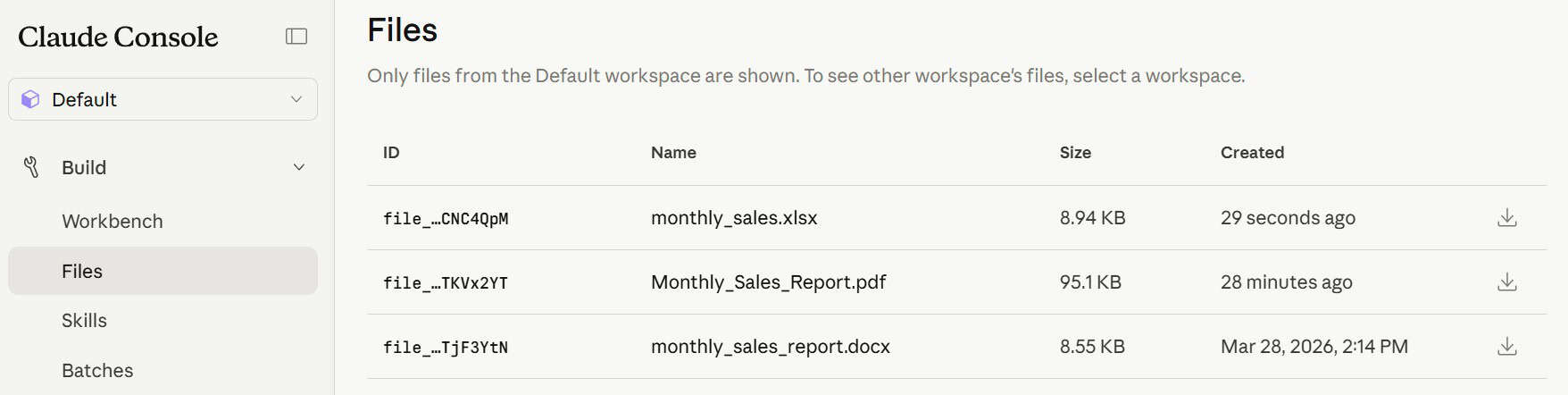
Thus, we use the AnthropicAPI provided by Spring AI to obtain the file information based on the file ID. Of course, the AnthropicApi.FileMetadata contains details about the file:
- file name
- file size
- creation date
- MIME type
While AnthropicDocument is a simple Java record to store the file name, the mime type and the file content, it returns them to the client via the controller:
public record AnthropicDocument(String fileName, String, mimeType, byte[] content) {
}
Thus, we have the basic application ready for testing.
5. Test Run
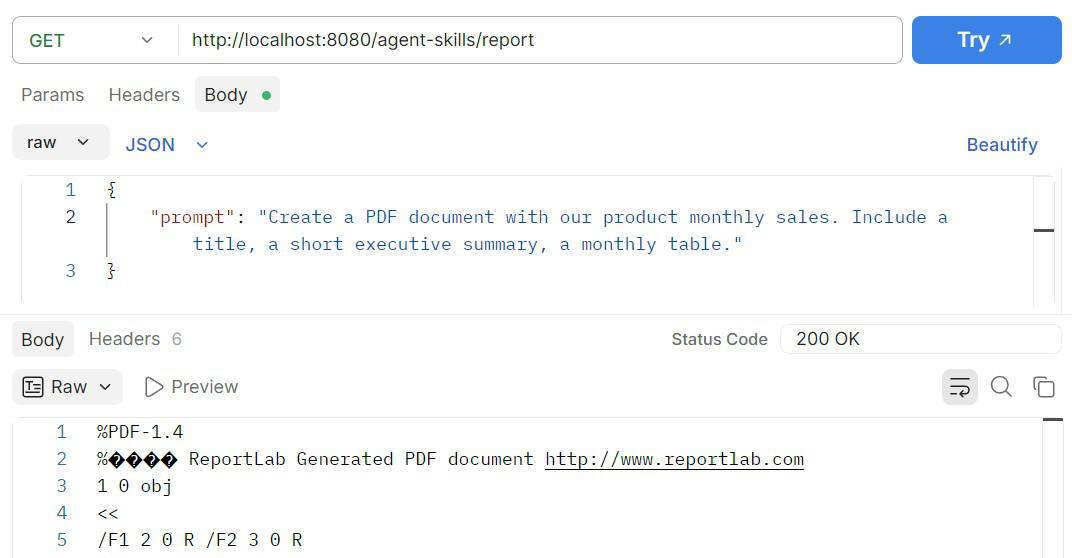
Everything is set, and we can start testing. To that end, let’s call the endpoint using Postman to trigger the request.
5.1. PDF Report
To begin with, we create an example request for generating a sales report with a summary and a table in PDF format:
At this point, we see the content, including the monthly sales table and a summary in the generated file:
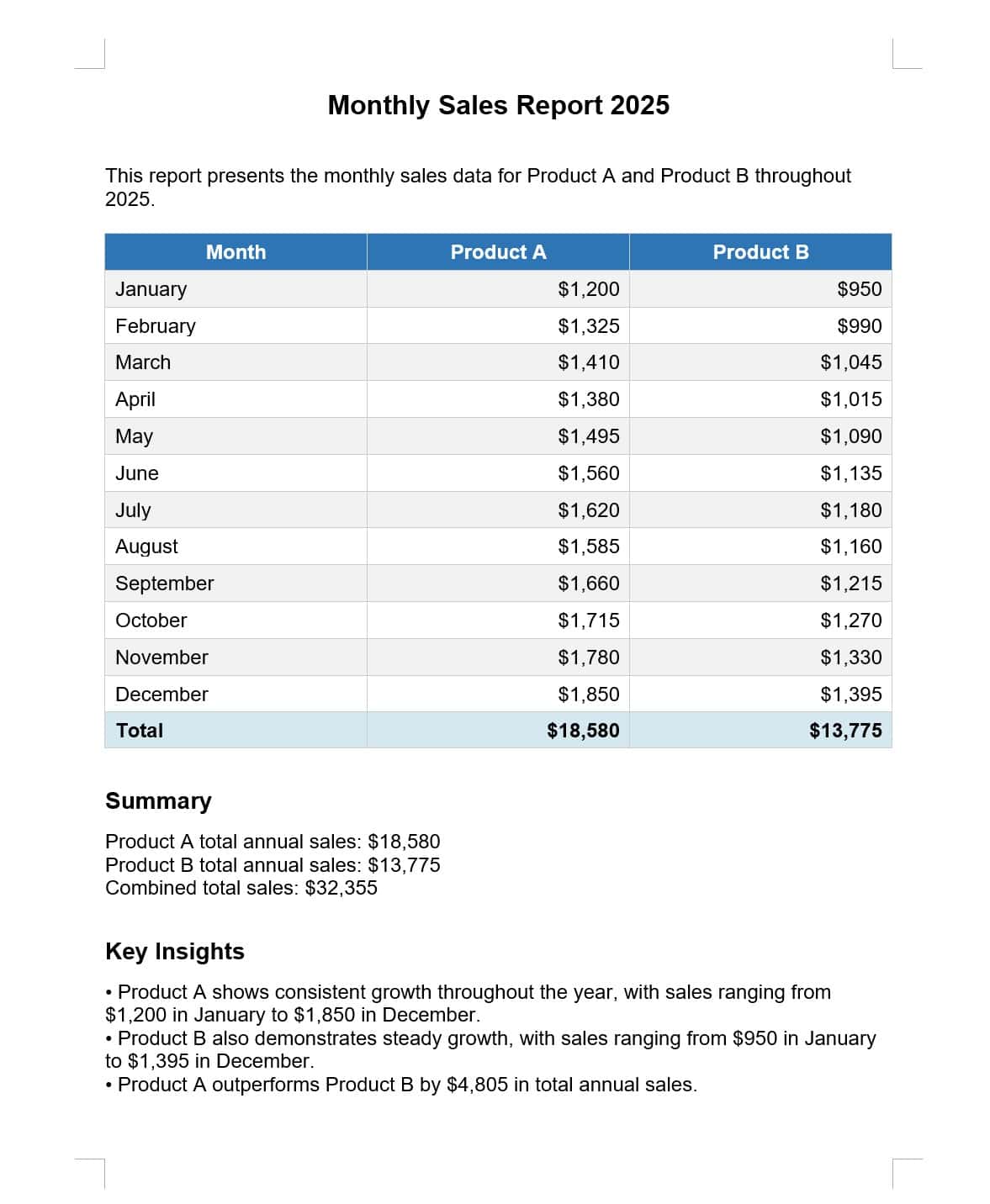
So, all information is there and in a structured format.
5.2. Excel Spreadsheet
Let’s change the prompt to generate an Excel spreadsheet instead, with a bar chart instead of a summary:
{
    "prompt": "Create a Excel spreadsheet for our product monthly sales. Include a monthly sales table, and a monthly bar chart next to the table."
}
Now, the report reflects the format change:
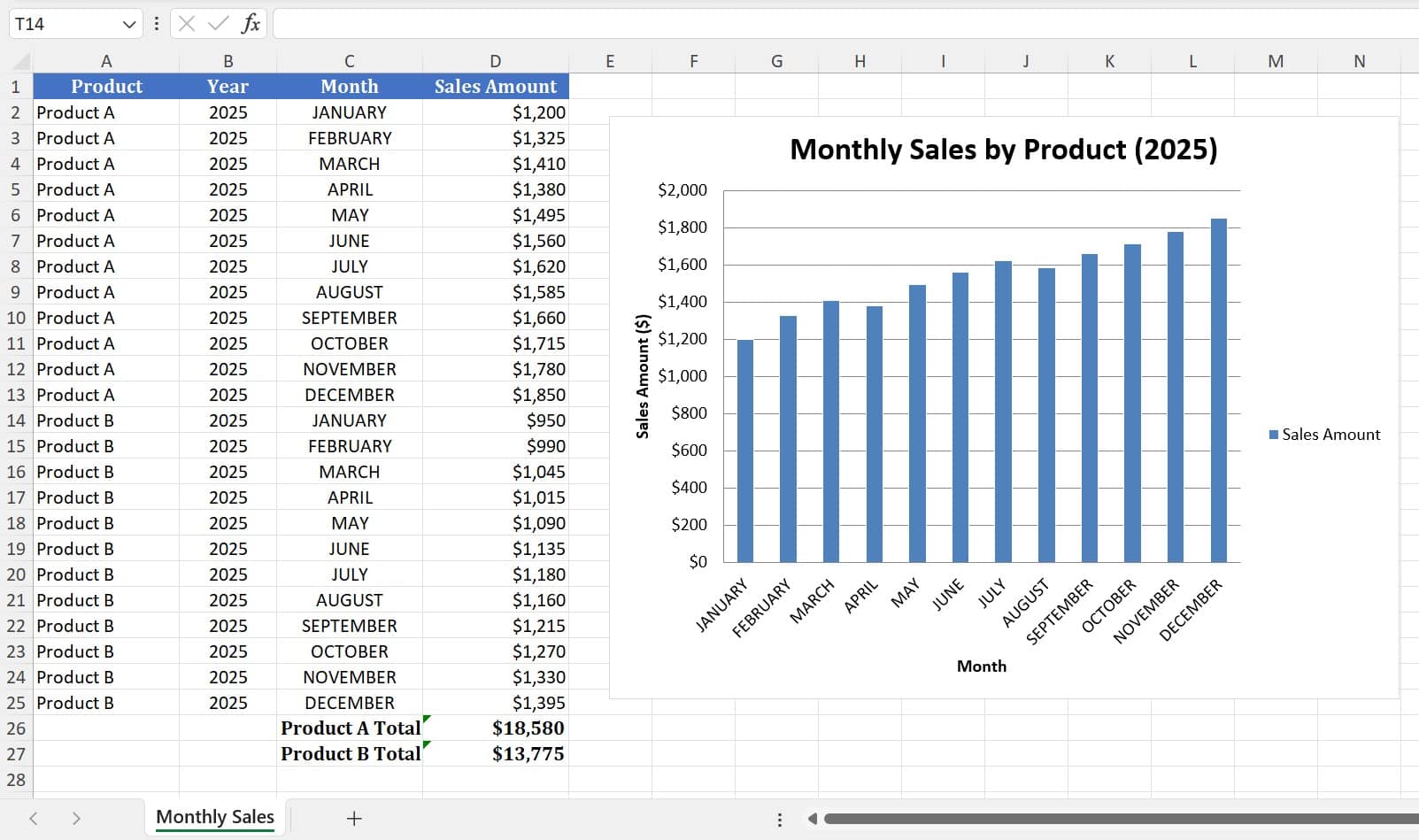
So, we see the spreadsheet with the correct data and formatting.
6. Conclusion
In this article, we explored how to integrate the pre-built agent skills of Anthropic with a chat model to generate various documents using Spring AI.
Furthermore, we demonstrated how to use a prompt to control the actual output document format. In particular, this provides flexibility to generate different document formats without changing the application logic.
As usual, the complete code examples are available over on GitHub. The post Anthropic Agent Skills Support in Spring AI first appeared on Baeldung.
Content mobilized by FeedBlitz RSS Services, the premium FeedBurner alternative. | 


