 Java, Spring and Web Development tutorials  1. Overview
While converting one type of number to another is a pretty straightforward operation. In some cases, we might have problems with the representation of numbers due to differences in byte orderings. Thus, we should always consider it during processing and conversion, especially if we receive raw data from outside. In this tutorial, we’ll learn how to convert bytes to shorts and vice versa. We also discuss the problem and the reason for this difference in representation, and we will see how to address it in code.
2. Byte Order
A combination of zeros and ones represents all the numbers in a computer. However, there is a difference between the two types of representation. One of them is called big-endian, the other is called little-endian. In big-endian, we use the most significant bytes on the left, so it’s written from left to right. At the same time, in little-endian, the least significant bytes are on the left, so the order is inverted: 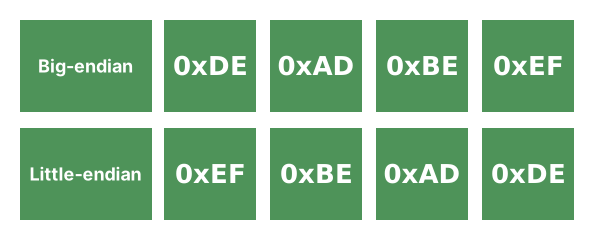
The reason for this difference is that little-endian could be more performant and computer-friendly on some architectures. At the same time, big-endian is more readable and more human-friendly. Big-endian is the representation we usually think about when we talk about binary numbers. Thus, we can have a situation where the information produced by one system wouldn’t match the byte-ordering of the system it should be used in.
3. Bytes to Shorts
When we use numbers in the same byte order, it’s pretty straightforward to convert them. We can use several approaches. For example, we can address this conversion using loops. In this case, we have to combine two bytes; we only need to move them slightly using bitwise shifts:
public static short[] bytesToShortsBigEndianUsingLoop(byte[] bytes) {
    int n = bytes.length / 2;
    short[] shorts = new short[n];
    for (int i = 0; i < n; i++) {
        shorts[i] = (short) (((bytes[2 * i] & 0xFF) << 8) | (bytes[2 * i + 1] & 0xFF));
    }
    return shorts;
}
Please note that, in this case, we don’t handle odd-sized arrays, since it’s just a demonstration. In production code, we should consider the possibility that the input would contain an odd number of bytes. We can also use the Stream API to do this. While it’s not the most perfect solution, in some cases, it might be more readable and simpler to implement:
public static short[] bytesToShortsBigEndianUsingStream(byte[] bytes) {
    int n = bytes.length / 2;
    short[] shorts = new short[n];
    IntStream.range(0, n).forEach(i ->
        shorts[i] = (short) (((bytes[2 * i] & 0xFF) << 8) | (bytes[2 * i + 1] & 0xFF)));
    return shorts;
}
As we can see, converting bytes into shorts with the same byte order is pretty straightforward. The same is true when we need to change the byte order as well:
public static short[] bytesToShortsLittleEndianUsingLoop(byte[] bytes) {
    int n = bytes.length / 2;
    short[] shorts = new short[n];
    for (int i = 0; i < n; i++) {
        shorts[i] = (short) ((bytes[2 * i] & 0xFF) | ((bytes[2 * i + 1] & 0xFF) << 8));
    }
    return shorts;
}
The logic is pretty simple: we have to swap the bytes so that the first one takes the least significant positions and the second the most significant ones.
4. Shorts to Bytes
The opposite operation is pretty similar. We cannot use downcasting, as our goal is to use individual bytes. Thus, we have to extract bytes with masks and bit shifts:
public static byte[] shortsToBytesBigEndianUsingLoop(short[] shorts) {
    byte[] bytes = new byte[shorts.length * 2];
    for (int i = 0; i < shorts.length; i++) {
        short value = shorts[i];
        bytes[2 * i] = (byte) ((value >>> 8) & 0xFF);
        bytes[2 * i + 1] = (byte) (value & 0xFF);
    }
    return bytes;
}
Little-endian would require mostly the same code, but we should flip the order in which we write the bytes:
public static byte[] shortsToBytesLittleEndianUsingLoop(short[] shorts) {
    byte[] bytes = new byte[shorts.length * 2];
    for (int i = 0; i < shorts.length; i++) {
        short value = shorts[i];
        bytes[2 * i] = (byte) (value & 0xFF);
        bytes[2 * i + 1] = (byte) ((value >>> 8) & 0xFF);
    }
    return bytes;
}
It’s important to remember that the byte order affects only the bytes inside the multi-byte values. We don’t need to change the order of bytes or the order of values themselves.
5. ByteBuffer
To simplify the process, we will use existing classes to handle the conversion out of the box. With the ByteBuffer and ByteOrder classes, the conversion:
public static short[] bytesToShortsLittleEndian(byte[] bytes) {
    short[] shorts = new short[bytes.length / 2];
    ByteBuffer.wrap(bytes).order(ByteOrder.LITTLE_ENDIAN).asShortBuffer().get(shorts);
    return shorts;
}
Here we wrap the bytes with a buffer and change the interpretation of the bytes (if required), without changing the actual order. As implied by the method name, we don’t copy or modify the original array, so any mutation may affect the result and processing. Reading the shorts also makes things easier, since we can pass an empty array to read the data into. However, we have the same limitation with odd-sized arrays. Thus, even with library methods, we should be careful about the amount of data we work with.
To use big-endian order, we can either provide an explicit value to the order method or omit it and use the default (big-endian). The default configuration isn’t platform-dependent and defined by the JVM. However, explicit configuration is always preferable, as it makes the code more readable and helps avoid bugs. With ByteBuffer, writing shorts into a byte array using little-endian also becomes a pretty trivial task:
public static byte[] shortsToBytesLittleEndian(short[] shorts) {
    ByteBuffer buffer = ByteBuffer.allocate(shorts.length * 2).order(ByteOrder.LITTLE_ENDIAN);
    buffer.asShortBuffer().put(shorts);
    return buffer.array();
}
Java provides many convenient classes that can make our code cleaner, and ByteBuffer is a good example. While we won’t use it daily, it’s useful to know it exists.
6. Conclusion
In this article, we discussed the conversion between bytes and shorts and also reviewed possible issues with byte order. While we might assume that the number representation is the same across platforms, that’s not the case. The difference in byte order might introduce some hard-to-debug problems. We always need to consider it while working with data, especially when we work with data from different systems. The post Converting Byte Array to Short Array and Vice-Versa in Java first appeared on Baeldung.
Content mobilized by FeedBlitz RSS Services, the premium FeedBurner alternative. | 


